Why You Are Seeing Clicks with No Earnings on Adsense

Have you ever experience a situation where the Google Ads on your blog(s) generated a few clicks and at the end, no earning showed up? A friend who runs Google ads on his blog once told me he was confuse when he saw a few clicks that could have generated about $10 for him, but shows $0. He said immediately, he began to fear and thought he has gone against Google TOS.

Clicks With no Earnings

I told him seeing clicks with no earnings is normal and that is usually caused by some reasons. The three common reasons for clicks with no earnings are:

Before you proceed, check:

1. Authorization Feature – if you are using the authorization feature on your Google Adsense account, you will only generate earnings on clicks from the website/blog you included in your authorized sites list. Any website not listed will generate clicks, but no earnings will be shown for it.

2. CPM ads Displayed – at times, low CPM ads may be served on your website/blog. For instance when an advertiser pays as little as $0.60 for each 1000 impressions of an ad, that simply means each impression worth $0.0006. With 9 ad impressions, you will earn total revenue of $0.0054 which will be represented as $0 on your account.

3. Invalid clicks – all clicks are monitored by Google System. Clicks considered invalid by their system will result to no earnings, but the numbers of click will be shown in the report. Advertisers are not charged for invalid clicks, so no earnings will appear for such activity.

The three reasons stated above are the sole contributors to clicks with no earnings.

Google Allow Users Send Money via Gmail

Google, the internet giant has announced to roll out a new feature that will enable its users to quickly and securely send money to friends and family directly within Gmail. According to a post on the official Google Commerce blog, Google Wallet has been integrated into Gmail. Very soon, a dollar sign will start popping in Gmail accounts of people who already use Google Wallet. A click will enable users’ state the recipient and the amount they wish to send as an attachment.

Send Money via Gmail

As the video below explains, the recipient doesn't have to have a Gmail address and you can receive money as well. Users who link their bank accounts to Google Wallet receive transactions for free. Those using debit or credit cards pay a 2.9% transaction fee (minimum $0.30), and transactions are limited to $10,000.


According to Google, the transactions are encrypted and stored on secure servers. Transactions are also monitored to preempt fraudulent activity. Google Wallet Purchase Protection also covers 100% of "eligible unauthorized transactions."

Recommended posts:

Google said it will gradually roll this service out to its Gmail users.

Enable SMS Notifications on Suspicious Google Login Activity

Google has so many wonderful products and services which majority of internet users participates therein. Google products and services are numerous. Some of their products and services include searching the internet, email, backing up of data, social media, website/blog monetization, advertising, Android and et al. To use any Google product or services, a Gmail account would be required as a source of ID.

Google Security: SMS Alerts

What will happen to all the accounts you’ve created under your Gmail account, if peradventure your Gmail account get hacked? The outcome could be disastrous, as your access to the files you’ve backed up on Google, you email inbox and other Google products or services you’ve opted for would have been blocked.

Useful Links:

In recent time, Google as allowed it users to get notifications via email in case there’s a suspicious login attempt on their account or their account password was changed. Although this might be good for some users, but it will be unfortunate if the email address is the Google account email hacked, as the email won’t be accessible anymore if it password has been changed by the perpetrator. Luckily, a new solution is now available. You can now set up a phone alert to get notified via SMS whenever any suspicious activity is noted on your account.

To activate the feature of receiving SMS whenever any suspicious activity is noted on your account, simply go to your Account Security Page at https://www.google.com/settings/security. Add your mobile phone number. Google will send a one-time verification code on the phone number you’ve provided. To complete the process, enable phone notifications by checking the two notification boxes, although both boxes are checked by default (as seen in the image below).

Google Security: SMS Notifications

Conclusively, it is important you have the most important security settings enabled for your Google account, i.e. the two-step verification. Though this has been made available by Google for some time now, it’s just a way by which Google link your account to the phone number you used to authorize login attempts. So whenever your account encounters any form of suspicious activity, Google will send a random code to your phone number which you will be requested to provide upon login.

How to Disable Google Plus Email and SMS Notifications

Google Plus is a social networking site which gives it users the abilities to create circles of friends, hang out via group video chat with your circles, find online articles based on your interests, and more. By default, you get notified by email or SMS or both whenever any action involving you is taken on Google Plus.

Disable-Google-Plus-Email-And-SMS-Notification

Although, receiving notifications via email is a good way of driving engagement on the Google Plus social network, but at the same time it’s annoying to some people. I remember the day I commented on a Google Plus page’s post before I went to bed. When I woke up the second day, 100’s of new email & SMS notifications poured in. I immediately disable the feature on my account as it doesn’t allow me to navigate through my inbox conveniently. If you also don’t want to be notified via SMS or email regarding what’s going on Google +, follow the simple steps I outlined below.

Check: How to Delete Google Plus Account

Stop Receiving Google Plus Notification via SMS

1. Go to your Google plus account settings page directly by visiting https://www.google.com/settings/plus - if you are not signed in already, provide your account to log in.

2. Navigate to the ‘Notification delivery’ section, and then click on the “don’t notify me option” (as seen in the image below).
Disable Google Plus SMS Notification

Stop Receiving Google Plus Notification via Email

1. Go to your Google plus account settings page directly by visiting https://www.google.com/settings/plus - if you are not signed in already, provide your account to log in.

2. Navigate to the ‘Receive notifications’ section. Just uncheck all the boxes under the Posts, Circles, Photos, Messenger, Hangouts, Events, Pages and Communities categories. Google Plus will disable email notifications if all the boxes are unchecked.

Disable Google Plus Email Notification

Now that you’ve successfully disable some/all features of Google Plus notifications, share your experience with others via the comment section below.

Need a Google Will? Set Yours Now!

We are now in an age where most of our personal assets such as our emails, social media identities, photos – live online. What do you think will happen to your data online when you die?

Write Your Google Will

At some times in our lives, we made a will with the list of our properties and those we want to give. So also lawyers, scholars, and even the government have been urging us to prepare for this eventuality by creating a social media will. This will, will be some sort of spelled-out plan for how you want your online life to be handled after you might have transcend this world.

Don't Miss: How Google Glass Works

Google has rolled out a process that lets you plan for that eventuality yourself, while you're still alive. It is called "Inactive Account Manager" tool. A tool that control what will happen to your account when you stop using Google, i.e. die. This tool will allow you to set a specified amount of time you want Google wait before taking action i.e. notify your trusted contacts which can be up to 10 in numbers. If Google doesn’t hear from you a month before the deadline you set, an alert will be sent to you via email or text message to make sure you aren’t just hibernating. After that month if you haven’t re-entered your account, Google will share your data with the list, provided you have chosen them. The email they will receive will look exactly like the image you are seeing below:
Google Will

Alternatively, you can set the tool to have your account deleted after being inactive for a specified time. Your Blogger posts, uploaded YouTube videos, Picasa albums, Google Voice messages, etc. will be wiped away.

"Not many of us like thinking about death – especially our own. But making plans for what happens after you're gone is really important for the people you leave behind," wrote project manager Andreas Tuerk in an official blog post. "We hope that this new feature will enable you to plan your digital afterlife -- in a way that protects your privacy and security -- and make life easier for your loved ones after you're gone,"

Visit https://www.google.com/settings/u/0/account/inactive to set the Inactive Account Manager feature yourself.

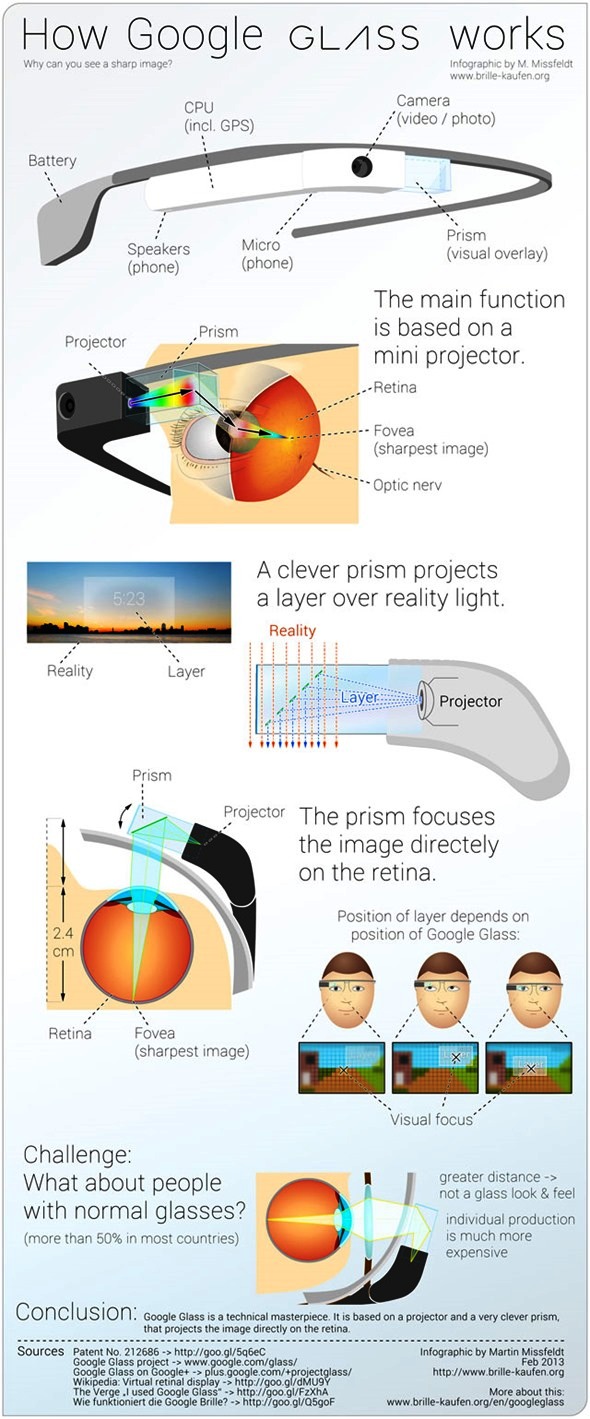
Martin Missfeld Explains How Google Glass Works [Infographic]

No one knows much about the Google Glass, i.e. its final speculations and how it works. Artist Martin Missfeld has created an infographic that explains how Glass's prism and projector system work.

Google Glass

As illustrated by the infographic, Google Glass is comprised by some of the hardware that would usually make up a smartphone, including a microphone, camera, battery, speakers and the CPU, in addition to a mini projector. Images from the mini projectors, which are cleverly hidden next to each of the lenses, are bounced off the prism straight into the user’s retina. This allows the user to see the world around them naturally, where “layers” of information can be displayed on top of it. As one would expect, the position of this augmented reality layer can be changed by simply repositioning the glasses.

How-Google-Glass-Works

One thing is for sure: We can't wait to see curious geeks tear open Glass for everyone to see when it comes out later this year for "less than $1,500."

Via: Brille-Kaufen

How to Watch YouTube Videos on Slow Internet Connection

YouTube is a video-sharing website with millions of videos available on it server. Registered and unregistered users can watch videos on YouTube and most of its videos were uploaded by individuals. I love watching videos on YouTube but the greatest challenge I face is slow buffering and this usually happened because internet is slow in my region, but I later found out a solution and now watch YouTube videos with my slow internet connection.

watch-Youtube-on-Slow-Internet-Connection

So today, I want to share how I was able to watch YouTube videos despite the slow internet connection in my region. If you also reside in a region where there is slow buffering here is a solution.

Before you proceed, read:

YouTube videos buffering can be speedup using YouTube feather beta. This helps to load YouTube video faster in a slow internet connection region because it removes the entire information panel, sidebar related video list, share button, comment, like and dislike button etc. from all YouTube video page once it is activated.

To activate YouTube feather beta, Click Here to visit their page and then click "Join Feather Beta" link to enable YouTube Feather beta on your account.

YouTube-Feather-Beta

Share you experience with YouTube feather beta with others via the comment box below.

How to Download / Backup your FeedBurner Email Subscribers List

One of the services offered by Google is FeedBurner, it is a good tool to manage site’s feed(s). FeedBurner is an email subscription service and it is commonly used by a lot of bloggers to serve their readers. FeedBurner offers so many features such as subscription management, email branding, customizable delivery and communication preferences, and a lot more.

Backup-FeedBurner-Email-Subscribers-List

It’s a good thing to back up / download FeedBurner Email subscribers list for any future use such as moving to another service like MailChimp, Feedblitz, Aweber and the rest. Follow the steps outlined below to download your FeedBurner email subscribers in excel or .csv format.

Before you proceed, read:

Steps to Download FeedBurner Email Subscribers List

1. Login to your FeedBurner account

2. From your FeedBurner dashboard, click on the feed you want to backup.

3. After selection, click on the ‘Publicize’ tab
Backup Feed Email Subscribers

4. Click on “Email Subscriptions” on Left side of the page.
Download Feed Email Subscribers

5. Now Go to the bottom of the page and click on View Subscriber Details
Backup Feed Email Subscribers List

6. Now click on “Export: CSV” option and save the excel file in your hard disk.
Download Feed Email Subscribers List

Now that you have downloaded your FeedBurner subscribers list, you can save it in a safe drive or upload it to cloud storage for easy retrieval whenever it is needed.

Tips to Get an Approved Adsense Account [Easiest Means]

Before, getting an approved Google adsense account wasn’t hard, you can set up a blog with an article on it and then apply for adsense. But now, getting an approved adsense account isn’t a joke matter, since your site/blog will go under two verification processes before you will finally get approved.

Easiest-Way-to-Get-Google-Adsense-Aproval

Many newbies just rush and apply for adsense after posting a plagiarize contents on their blog without reading Google policies to know what they are required to put in place before applying for Adsense, at the end, they will be disappointed with the reply from adsense team that their application cannot be approve with stipulated reason(s).

Before we move on you may like to read:
10 Best Alternatives to Google Adsense
Make Money with Information Marketing Before Google Adsense Approval
Get Approved Adsense Account via Third Party
Top Paying Google Adsense Keywords

The simple secret to getting an approved adsense account is to play the game according to Google rules. Not getting approved by adsense simply means your site/blog is violating one or more Google policies. You need to put the steps outlined below into consideration if you want you adsense account to be approved without any ado.

1. Add Proper Meta Tags

Make sure you have added the necessary Meta tags that best describe your blog before applying for adsense.

I don’t know how to write & add Meta tags: Learn & Generate Search Engines Friendly Meta Tags

2. Duplicate Content

Don’t ever copy and paste contents from the other website/blog, if you do, Google will know and this can be a stumbling block from getting adsense approval. Not that you cannot use other people’s idea, but make sure the idea is rewritten in your own understanding to make it unique. Before you apply for adsense, make sure you have written at least 50-100 quality posts

3. Custom Domain Name

Don’t ever apply for adsense with sub-domains such as mysite.blogpot.com. Though they accept that in the old days, but now, you application will not be approve without a custom domain name. You can get a domain name from www.godaddy.com. Getting a custom domain name portray you to adsense team as a serious person ready for work.

Need help! I Can Assist You to Get A Domain Name

4. Organic Traffic

Before you apply for adsense, your blog must have a reasonable amount of organic traffic. Organic traffic simply means traffic from search engines.

5. Include Pages

You need to create page for contact us, about us, privacy policy, site map and terms & condition pages. You need to do this in order to get approved..

6. Apply for Adsense

You can now apply for adsense once you know you have fulfilled step 1-5. Make sure you cross check the information you supplied during registration very well.

In conclusion, I will tell you don’t rush, just be patient, work on your blog traffic, produce quality contents (search engines love them). If truly you want adsense to approve you, don’t use any other ad network such as infolinks, chitika, etc during this time. These tips have work for so many publishers and I believe it will work for you provided you dance according to the tune.

Got any question or better tips that have worked for you? Don’t hesitate to use the comment box below.

Top 30 Highest Earning Websites 2012

One of the best places to make money is the online market. Today, am presenting you the list of the top 30 earning websites in the world, and what baffles me most is that some of these websites make up to $50 million in revenue a day, isn’t that much? See what these websites make in revenue per seconds below.

Highest-earning-websites-2012

1) Google

Founders : Larry Page and Sergey Brin
Revenue/sec : $691.29
Annual Revenue: $22,000,000,000

Google is the #1 in this list. Google Search, is the most-used search engine on the World Wide Web, receiving several hundred million queries each day through its various services.

2) Amazon

Founder : Jeff Bezos
Revenue/sec : $607.05
Annual Revenue : $19,200,000,000

Amazon.com is the world’s largest online retailer of electronic commerce company having headquarters in Washington, United States.

3) Yahoo

Founder : Jerry Yang and David Filo
Revenue/sec : $228.31
Annual Revenue : $7,200,000,000

Yahoo provides web portal, search engine (Yahoo! Search), Yahoo! Directory, Yahoo! Mail, Yahoo! News, Yahoo! Groups, Yahoo! Answers, advertising, online mapping, video sharing website and services.

4) eBay

Founder : Pierre Omidyar
Revenue/sec : $ 199.45
Annual Revenue : $ 6,300,000,000

eBay.com, is an online auction and shopping website in which people and businesses buy and sell a broad variety of goods and services worldwide.

5) Msn/Live

Founder : Nathan Myhvoid
Revenue/sec : $102.00
Annual Revenue : $ 3,200,000,000

Online service provider of Microsoft’s internet services and products.

6) PayPal

Founder : Luke Nosek, Max Levchin and Peter Thiel
Revenue/sec : $71.40
Annual Revenue : $2,250,000,000

PayPal is a global e-commerce business allowing payments and money transfers to be made through the internet, allowing online transactions

7) iTunes

Founder : Jeff Robin
Revenue/sec : $60.00
Annual Revenue : $1,900,000,000

The iTunes Store is a software-based online digital media store operated by Apple Inc.

8) Rueters

Founder : Marshal Vace
Revenue/sec : $60.00
Annual Revenue : $1,900,000,000

International new Agency working as a provider of financial market data

9) Priceline

Founder : Jesse Fink
Revenue/sec : $59.6
Annual Revenue : $1,850,000,000

Priceline is a commercial website which helps users obtain discount rates for travel-related items such as airline tickets and hotel stays.

10) Expedia

Founder : Added Mark Schroeder
Revenue/sec : $46.00
Annual Revenue : $1,450,000,000

Expedia is an Internet-based travel website based in the US with localized sites for 22 countries. It books airline tickets, hotel reservations, car rentals, cruises, vacation packages and various attractions and services via the World Wide Web and telephone travel agents.

11) NetFlix

Founder : Reed Hastings
Revenue/sec : $38.00
Annual Revenue : $1.100.000,000

Netflix is an American provider of on-demand Internet streaming media.

12) Travelocity

Founder : Terry Jones
Revenue/sec : $ 38.00
Annual Revenue : $1,100,000,000

Travelocity is the sixth-largest travel agency in the United States and the second-largest online travel agency.

13) Zappos

Founder : Nick Swinmurn
Revenue/sec : $31.70
Annual Revenue : $1,000,000,000

Zappos.com is an online shoe and apparel shop currently based in Henderson, Nevada.

14) Hotels.com

Founder : David Litman
Revenue/sec : $31.70
Annual Revenue : $1,000,000,000

Hotels.com is a website for booking hotel rooms online and by telephone. The company has 85 websites in 34 languages, and lists over 145,000 hotels in approximately 19,000 locations

15) AOL

Founder : Erik Prince
Revenue/sec : $30.50
Annual Revenue : $960,000,000

AOL is an American global Internet services and media company, providing best range of Software suits to its users.

16) Orbitz

Founder : Jeff Katz
Revenue/sec : $28.00
Annual Revenue : $870,000,000

Orbitz is a leading online travel company that enables travelers to research, plan and book a broad range of travel products, facilitating 1.5 million flight searches and one million hotel searches every day.

17) Overstock

Founder : Robert Brazell
Revenue/sec : $27.00
Annual Revenue : $834,000,000

Online retailer of many brands.

18) Myspace

Founder : Tom Anderson
Revenue/sec : $ 25.00
Annual Revenue : $800.000.000

Social networking site

19) Skype

Founder : Niklas Zennstrom
Revenue/sec : $18.00
Annual Revenue : $550,840,000

Skype provides an online voice software system, The service allows users to communicate with peers by voice, video, and instant messaging over the Internet. Phone calls may be placed to recipients on the traditional telephone networks. Calls to other users within the Skype service are free of charge, while calls to landline telephones and mobile phones are charged.

20) Sohu

Founder : Zhang Chaoyang
Revenue/sec : $14.00
Annual Revenue : $430,000,000

Sohu is a Chinese company that offer advertising, a search engine, online multiplayer gaming and other services.

21) Buy.com

Founder : Robb Brock
Revenue/sec : $12.68
Annual Revenue : $400,000,000

Buy.com is an online retailer. It began by selling computers and electronics and has expanded itself offering many other categories

22) StubHub

Founder : Eric Baker
Revenue/sec : $13.00
Annual Revenue : $ 430,000,000

StubHub is an online marketplace owned by eBay, which provides services for buyers and sellers of tickets for sports, concerts, theater and other live entertainment events.

23) Alibaba

Founder : Jack Ma
Revenue/sec : $10.00
Annual Revenue : $315,000,000

Aliibaba is known as the world’s largest Online Business to business trading platform for small businesses

24) Facebook

Founder : Mark Zuckerberg
Revenue/sec : $9.50
Annual Revenue : $300,000,000

Biggest social networking site

25) YouTube

Founder : Chad Hurley, Jawed Karim and Steve Chen
Revenue/sec : $ 9.50
Annual Revenue : $300,000,000

Online Video sharing platform.

26) Blue Nile

Founder : Mark Vadon
Revenue/sec : $9.40
Annual Revenue : $295,000,000

Blue Nile Inc. is an online specialty retailer of fine jewelry. Its the largest online retailer of diamonds at the moment.

27) Tripadvisor

Founder : Stephen Kaufer
Revenue/sec : $8.20
Annual Revenue : $ 250,000,000

TripAdvisor.com is a travel website that assists customers in gathering travel information, posting reviews and opinions of travel-related content and engaging in interactive travel forums.

28) Getty Images

Founder : Mark Getty
Revenue/sec : $7.40
Annual Revenue : $230,000,000

It is a supplier of stock images for business and consumers with an archive of 80 million still images and illustrations and more than 50,000 hours of stock film footage.

29) Bidz

Founder : Garry Itkin
Revenue/sec : $6.70
Annual Revenue : $200,000,000

Bidz.com Inc.is an online auction and shopping website in which people and businesses buy and sell a broad variety of goods and services worldwide

30) NYTimes

Founder : Henry Jarvis Raymond
Revenue/sec : $6.00
Annual Revenue : $ 175,000,000

the New York Times (NYT) is an American daily newspaper and Its website is the most popular American online newspaper website, receiving more than 30 million unique visitors per month.

Are you also a website/blog owner? You can also share what you make per seconds via the comment box below.

Google Page Rank: Meaning and How to Increase it [Infographic]

Most bloggers and webmasters are concerned about Page Rank, but they don’t really know how it works. I have received series of questions on what Google page rank is about and most people often take Google Page rank as their Google ranking.

Google-Page-Rank

Today, I want to share an image I found online that explains how page rank work. With this image every webmasters and bloggers who doesn’t have understanding of how Google page rank will understand it better. This picture also explains what really matters when trying to increase your blog/website page rank.

Understand-Google-Page-Rank
Image by zippycart.com

How To Delete or Cancel a Google Plus Account

I recently shared a post on how to delete a Facebook account permanently. But today, I want to share how you can easily cancel or delete a Google+ account without having any effect on other Google services (gmail, adsense, adword, docs etc.) you subscribed to. You can also check: How to Disable Google Plus Email and SMS Notifications

How-To-Delete-Google-Plus-Account

Steps to Cancel or Delete a Google+ Account

1) Log in into your Google Plus account

2) Locate and click on your account name or email address on the upper right corner and click on ‘Account Settings’

3) In the account service page, locate and click on ‘Delete profile and remove associated social features’.

4) On the next page, select ‘Delete Google+ content’ and then click ‘Remove selected services’.

That’s all. Once you’ve compete the steps outlined above, you’re no longer among Google+ services or its circles. But you can rejoin back in the future if you desire to.

High Paying Google Adsense Keywords of 2013

We all know Google Adsense is a simple low risk way for publishers to monetize their website/blog content. If you’re already a Google Adsense publisher making money from it, you will probably know the importance of keywords and keyword research.

High-paying-Google-Adsense-Keywords

Google Adsense is a pay per click program that you get paid each time someone clicks on the ad on your site. The amount of money you’re paid for each click varies to your content and how it relates to your keywords. To make money with Google Adsense, you need to do some keyword research and Adsense Optimization. There are thousands of articles online that can assist you with keyword research and Adsense Optimization.

Today, I have gathered some list of High Paying Adsense keywords for 2013. These leading keywords in Google Adsense program are generated using keyword research programs. Below are the lists of high paying keyword of Google Adsense:

Avg CPC == Keywords
97.44 == domains yahoo
79.81 == domain name yahoo
68.91 == dc hair laser removal washington
66.15 == law lemon wisconsin
51.14 == hair removal washington dc
41.97 == domain registration yahoo
40.36 == benchmark lending
38.05 == domain yahoo
37.86 == yahoo web hosting
37.29 == hair laser removal virginia
36.59 == peritoneal mesothelioma
36.55 == ca lemon law
34.13 == best buy gift card
31.1   == adverse credit remortgage
30.98 == mesothelioma information
29.77 == law lemon ohio
29.34 == att call conference
29.1   == insurance medical temporary
28.95 == illinois law lemon
28.78 == mesothelioma symptoms
28.51 == angeles drug los rehab
28.26 == personal injury solicitor
28.23 == att go
28.03 == accident car florida lawyer
27.11 == google affiliate
27.11 == att wireless
26.31 == 100 home equity loan
26.28 == mcsa boot camp
26.19 == anti spam appliance
26.17 == adverse remortgage
26      == chicago hair laser removal
25.98 == att conference
25.84 == at and t
25.45 == laser hair removal maryland
25.15 == mesothelioma
24.88 == buy gift card
24.8   == mesotheloma
24.52 == student loan consolidation program
24.45 == california law lemon
24.3   == event management security
24.15 == canada personals yahoo
24.15 == orlando criminal attorney
23.78 == uk homeowner loans
23.71 == vioxx lawsuit
23.55 == compare life assurance
23.34 == criminal defense federal lawyer
23.29 == american singles
23.09 == federal criminal defense attorney
23.07 == laser hair removal manhattan
23.03 == att prepaid wireless
23      == fortis health insurance temporary
22.93 == miami personal injury lawyer
22.75 == hair removal chicago
22.74 == at and t cell phones
22.61 == refinance with bad credit
22.47 == malignant mesothelioma
22.45 == lease management software
22.34 == primary pulmonary hypertension
22.27 == miami personal injury attorney
22.24 == anti spam lotus notes
22.23 == life insurance quotes
21.91 == egg credit
21.8   == anti spam exchange server
21.77 == lemon law
21.67 == google adsense
21.67 == best consolidation loan student
21.63 == refinance with poor credit
21.49 == employee leasing
21.36 == student loan consolidation center
21.35 == buyer mortgage note
21.34 == federal student loan consolidation
21.33 == symptoms of mesothelioma
21.31 == city hair laser new removal york
21.2   == att wireless com
21.15 == san diego dui lawyer
21.14 == indiana law lemon
21.1   == law lemon michigan
20.8   == angeles criminal defense los
20.8   == refinancing with poor credit
20.64 == home equity loan
20.64 == action class lawsuit vioxx
20.49 == term life assurance
20.47 == e loan
20.46 == celebrex lawyer
20.37 == vasectomy reversal
20.36 == mortgage rates refinancing
20.28 == attorney law lemon
20.28 == consolidate student loans
20.17 == home equity loans
20.11 == mesothilioma
19.99 == new york personal injury lawyer
19.98 == home equity loan rates
19.97 == auto insurance quotes
19.93 == georgia law lemon
19.9   == homeowner loans
19.73 == equity loan rates
19.68 == administration lease software
19.63 == egg credit card
19.58 == student consolidation loans
19.55 == microsoft anti spam
19.41 == mesothelioma prognosis
19.29 == second mortgages
19.26 == 21 auto century insurance
19.25 == employee florida leasing
19.21 == federal consolidation loan
19.17 == equity loan
19.14 == personal injury attorney colorado
19.03 == accident lawyer michigan
19.02 == refinancing with bad credit
19.02 == home equity line of credit rates
19.01 == federal consolidation
18.96 == non profit debt consolidation
18.95 == pay per click affiliate
18.86 == city hair new removal york
18.85 == acid reflux disease diet
18.77 == refinance poor credit
18.75 == equity loans
18.73 == student loan consolidate
18.6   == consolidate loans
18.51 == secured loans
18.49 == criminal lawyer new york
18.43 == affiliate per click
18.29 == chicago personal injury lawyer
18.29 == los angeles dui lawyer
18.19 == att prepaid
18.1   == angeles criminal defense lawyer los
18.04 == critical illness insurance life
18.03 == irs lawyer tax
18.03 == laser hair removal new york
18.02 == comcast high speed
17.98 == personal yahoo
17.78 == san diego dui attorney
17.77 == michigan personal injury
17.73 == automobile law lemon
17.66 == cheap insurance life term
17.52 == home loans refinancing
17.51 == consolidate college loans
17.45 == cheap life insurance
17.38 == vioxx law suit
17.32 == student loan refinance
17.3   == car hire alicante spain
17.28 == tax attorney
17.28 == refinancing my home
17.24 == criminal dallas lawyer
17.24 == line of credit home equity
17.23 == litigation vioxx
17.2   == at and t phones
17.15 == criminal defense attorney los angeles
17.14 == commodity online trading
17.13 == home equity rates
17.12 == adsense
17.12 == law lemon mass
17.11 == equity home
17.1   == arizona law lemon
17.09 == child molestation attorney
17.09 == home line of credit
17.06 == alicante car rental spain
17.03 == attorney defense federal
17.02 == san diego criminal attorney
16.79 == injury lawyer new york
16.78 == attorney injury new personal york
16.77 == at and t mobile
16.72 == pleural mesothelioma
16.61 == augmentation breast diego san
16.61 == home equity poor credit
16.6   == health insurance temporary
16.6   == compensation mesothelioma
16.6   == 21st century insurance
16.52 == cheap insurance medical
16.51 == angeles criminal lawyer los
16.49 == low cost term life insurance
16.48 == home refinance loans
16.45 == eloan
16.44 == life insurance quote
16.39 == cheap life assurance
16.33 == 125 equity loan
16.32 == anti spam exchange
16.31 == credit equity home line
16.3   == att go phone
16.3   == dui florida lawyer
16.27 == hair removal new york
16.14 == merchant account international
16.11 == vioxx class action
16.1   == 125 home equity loan
16.1   == life insurance quote online
16.09 == consolidation loan
16.04 == equity line of credit
16.02 == carolina law lemon north
16.02 == equity rates
15.87 == direct home insurance line
15.86 == angeles attorney los tax
15.85 == credit home line
15.81 == term insurance
15.81 == auto insurances
15.8   == debtfreedirect
15.8   == refinance comparison
15.77 == acid reflux treatment
15.77 == bad credit mortgage refinance
15.73 == college loan refinance


The top keyword on the list above worth almost a hundred dollars, so it will be good if you can choose keywords related to your niche, write good content and increase your earnings with Google Adsense.